Natural language interface to SQL using LLMs
Database accessibility and AI
The AI world is growing fast and many users are seeking ways to integrate emerging AI technologies, such as chatbots, into their workflows. In particular, the MonetDB team has seen a surge of experimentation in enriching database management systems with AI. The next logical step is to build our own solutions, so that MonetDB users can more easily query a database with their preferred large language models (LLMs*). Whether such a combination materializes in a real productivity boost for experienced developers remains to be seen. Nevertheless, AI presents an opportunity to make MonetDB more accessible to a broader scope of users who are not (yet) familiar with database technologies and to developers who are still learning SQL.
While AI provides the means to formulate a database query using natural language, we still need a reliable and secure way for the LLM to interact with the database system. Without a common “conversation language”, the LLMs would have to guess how to discover the available relational tables in the database, how to formulate and send a query, how to retrieve query results, what the custom syntax and functionality are, etc. All of this can lead to broken prompts, security holes and a lot of extra engineering work.
This common “conversation language” is the Model Context Protocol (MCP); it defines a clean, standard interface that any LLM can use to explore and interact with data sources. By placing a custom MonetDB MCP server between an LLM and a MonetDB database, we can eliminate all the engineering plumbing, safeguard the data, and enable database users to focus on formulating questions, rather than worrying about the interactions between the LLM and MonetDB.
What is MCP
The Model Context Protocol (MCP) is a simple standard for LLMs to interact with other tools and applications. The protocol enables a LLM to discover which tools are available and understand what each tool can do such that a LLM that has been trained on how to do tool calling, how to receive tool results and how to integrate the results can make use of those tools. The LLM can conduct all of this work without having to worry about the tools’ internals or where they run. By adopting MCP for an LLM-powered application, you move tool integration logic out of the prompt into a clean and reusable layer. This strategy makes code easier to write and maintain, and it also gives a solid foundation for building a custom MCP server for MonetDB that delivers more reliable results.
MonetDB MCP server
The MCP server for MonetDB is part of an experimental suite we are building to gradually make more components in the MonetDB ecosystem easier to reach and use. The core idea is straightforward: build a lightweight, read-only gateway that allows LLMs to query MonetDB without requiring database users to write any SQL themselves. The MonetDB server isolates each user session, enforces strict permission rules at the schema level, and only exposes the minimal schema information needed for a prompt, keeping the interactions with the LLMs fast and secure. By handling tool discovery and invocation through the Model Context Protocol, we take the complexity out of the prompt and place it in a clean and reusable layer. In this way, users can focus on what they want to ask, rather than how to formulate their questions as SQL queries.
From natural language to executing SQL, result retrieving and exploration
Since the MonetDB MCP implementation does not have a graphical interface, we temporarily use a system, which we refer to as “System M”, with a graphical MCP client in the examples below, together with a Wordle database to demonstrate the capabilities of the MCP.
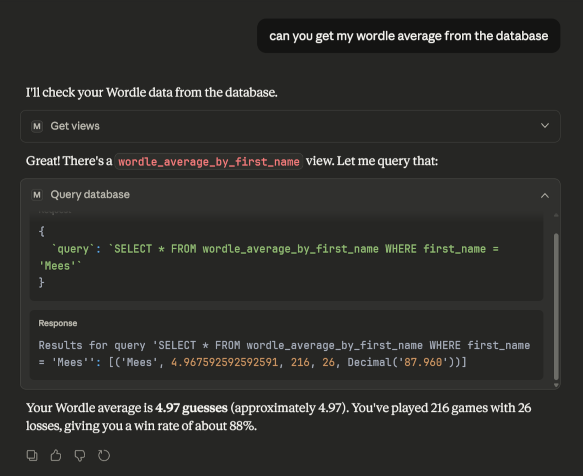
From our experiences, one of the simplest and fastest ways to give an LLM insight into a database is through a tool that does a view lookup of the database and attaches the view names directly to the context window, which can be used in the next steps. By doing this, the model can bypass the usual steps of discovering schemas or pulling sample data, because it has already learnt what is available.
In the example below, we are trying to retrieve “my Wordle average from the database”. You can see the LLM going through the views it has available (reasoning). In this case, the LLM finds one and then infers that this view will require a WHERE clause, which it adds successfully.
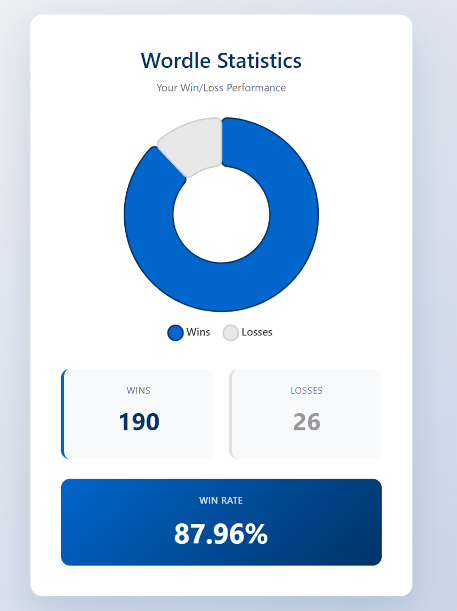
Afterwards, the LLM is asked to create a pie chart for these results, which it did successfully in one-shot. This is a good showcase, as it reveals that not only querying the database becomes more accessible to users, but also reading and understanding the resulting data can be made clearer using a LLM.
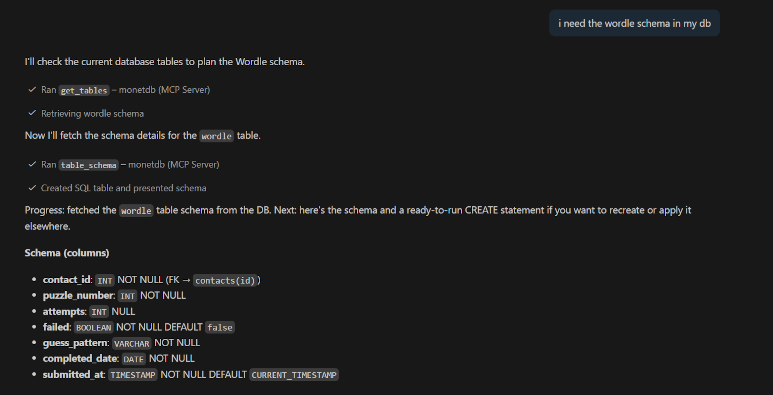
There are also other ways this might be useful. Perhaps you are coding in your IDE and require one of the schemas in your database. Or, maybe you are vibe coding (🧂🧂🧂🙂) a project that uses a database, and you want your agent to find any schemas or views in your database dynamically instead of pre-loading them all into its context.
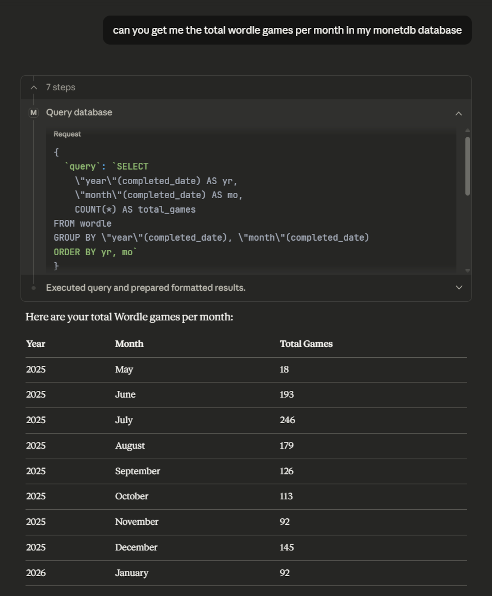
Furthermore, there is the “query database” tool, which allows the LLM to execute any read-only query in the database and return the results. Many users are likely to write prompts which are specific to their use cases. This means that to handle such prompts, the LLM can rarely reuse existing views; instead, it will often need to generate custom queries. Therefore, an LLM will need to interpret a natural language prompt, proceed to generate potentially long and complex SQL queries, and go through the potentially equally complex query results. Finally, if the user prompts the database structure and the query results provide sufficient context, the LLM can present those results to its users in a human-readable fashion.
Some practical considerations
In our tests, “System M” works fairly smoothly with the MCP tools and can generate solid simple SQL on its own. However, with just a few prompt tweaks, we can make “System M” work even better. One example is to add a short cheatsheet of MonetDB’s date functions (such as MONTH, YEAR, and DAY) and the INTERVAL syntax, so that “System M” does not have to guess the exact syntax.
However, we would also like to emphasize that such improvements are highly dependent on the specific LLM being used and often require a lot of trial and error. Getting the system prompt just right takes time and effort, but the payoff is clearer and more reliable SQL generation. Other common pitfalls include:
“System M” often heavily relies on information provided in user prompts. This means that unless instructed otherwise, it will default to user-provided information instead of searching for its own. This behaviour can be problematic if the user is unfamiliar with the database structure and is not aware of similarly sounding tables. For example, perhaps there is a USERS table and a separate PAIDUSERS table, in which case the user might say in the prompt: “I need a count of all paying users”. The LLM might then simply use the USERS table instead of first checking the tables list and discovering the PAIDUSERS table.
“System M” may sometimes omit data if it considers it negligible, even though the data might be exactly what you are looking for. Consider the Wordle example above, “System M” might not include a certain user in its final natural language response or in a diagram if the user has only played a few games. Natural language to SQL benchmarks put some SQL generation models at a generation accuracy of 90%, but even this number tends to vary from domain to domain.
Conclusion
In our opinion, this has been a worthwhile attempt to experiment with LLMs and open up MonetDB to a wider audience. However, careful consideration needs to be taken about letting LLMs interact this deeply with possibly sensitive data. Both LLMs and MCP are continuously being refined, so you can expect the MonetDB MCP server to become more capable and stable over time.
* LLM refers to any AI language model of any size.